top of page
Truckers Trip Planning App Logo

The Truckers Trip Planning App Blog provides Industry news and discussions about truckers trip planning and load decisions geared towards helping company truck drivers, leased operators and owner operators gain greater profits from the loads they run.

Truckers-trip-planning-app-on-mobile (1)

Learn how to use the Load Comparison Trucking Profit and Loss Spreadsheet from the Truckers Trip Planning App and compare your profits and losses for up to five loads.


The Load Comparison App can be used for two very important functions to help lease operators and owner operators track their profits and losses. The trucking profit and loss spreadsheet is designed to broaden your focus on running more profitable loads.


Objective 1: You can use the Load Comparison #TruckingProfitandLossSpreadsheet to compare up to five loads from the load boards you use to quickly determine which of the five is the most profitable load for you to run based on your truck operating cost.


  1. First update your #costpermilecalculator to ensure that it is reporting the correct cost per mile to the trucking profit and loss spreadsheet.

  2. Next select the button to go to the Load Comparison App.

  3. Update your core data. This information will be persistent on the app and will only need to be updated when you need to make changes. To make changes you simply need to reenter the updated data.

  4. Select the number of loads that you will be comparing from the load board or whatever source you get your loads.

  5. Update the Load Pay, the Fuel Surcharge, the empty miles, and loaded miles for each of the loads in which you will compare.

  6. Scroll down and click on the "Compare Your Loads" button and the information you will need to analyze your loads will be calculated.

  7. You should be able to see which of the loads will be the most profitable based on your trucks operating cost per mile.

  8. To get an even clearer representation, select the "Show Chart" button to visualize the profit and loss in a bar chart.

  9. The calculations will remain on the trucking profit and loss spreadsheet when you close the app and will be available for future use until you decide to reset the app to analyze more loads.

Objective 2: You can use the profit and loss spreadsheet to review the loads you run one at a time so that you can see when your profitable loads are falling behind loads that are causing you a loss. By tracking your loads, you can track what you are doing and make adjustments on the loads you are running to increase your profits rather than waiting until the end of the week to look back and find that you didn't accomplish as much as you could have had you selected better loads.


Using the Load Comparison App to track your performance is relatively no different than analyzing the loads from the load board except that you will be updating the truckers profit and loss spreadsheet after each load that you run.


Update the Trucking Profit and Loss Spreadsheet for each load that you run.

  1. First update your cost per mile calculator and proceed to the Load Comparison App.

  2. Next update your core data just as you did before.

  3. Change the number of loads to one and update the Load Pay, the Fuel Surcharge, the empty miles, and loaded miles for each of the loads in which you will compare. NOTE: If you do not get the load pay or the fuel surcharge and is normally paid by the mile then simply multiply the total of the empty and loaded miles by the cents per mile and enter the result in it's appropriate place.

  4. Scroll down and click on the "Compare Your Loads" button to update the profit and loss for the load.

  5. On your next load return to Step 1 and repeat the process for up to 5 loads.

As you run your loads and add each load to your trucking profit and loss spreadsheet you should be noticing what kind of loads you are running and whether they are profitable as you would like them to be. If they are not then you should be looking to make some changes. Don't be too concerned if one load is far less profitable than the others unless you can see that you have absolutely no way of making up for it.


The Trucking Profit and Loss Spreadsheet Load Comparison App is another example of our commitment to set the standard for the meaning of apps that are "Built By Truckers For Truckers". The app was suggested by one of our members, Jason Lowery, who assisted in the build. Many thanks to him for his commitment to help other truckers.


The Load Comparison App will be free and available in your download with Full Access to the Truckers Trip Planning App, or when you download either the Solo Lease and Owner Operator Trip Planning App, or the Team Lease and Owner Operator Trip Planning App.

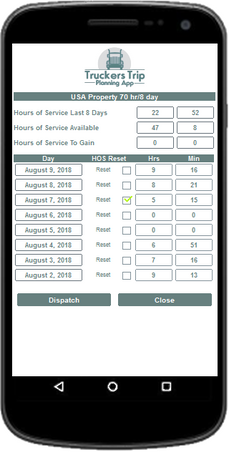


The Hours of Service Calculator from the Truckers Trip Planning App allows solo and team truck drivers to recap their hours of service to see how much time they have available to run a load and the remaining hours of service they will have after they run the load.


As Professional Drivers, we all know that the most stressful part of driving is the constant race you have with time and it stands to be the reality that no matter how fast you drive, time will always win that race. Based on that fact alone, your safety and the safety of all those around you is dependent upon your ability to eliminate the risk of driving while under the tremendous stress of trying to reach your destination before time runs out on you.


Needless to say, stress is the root cause of driver fatigue, driver injuries, accidents, and road rage. With the developing of the Truckers Trip Planning App, you now have access to the tools you need to get at the root of this problem.


While most truck drivers would argue that they don't need an hours of service calculator since they can get their remaining hours of service from their logging device, it is obvious that they have not yet realized that "eliminating the need to race time and the elimination of not knowing if you can deliver your load on time" is an essential element in eliminating unnecessary stress while driving.


The Hours of Service Calculator is included on the Dispatchers, Company Drivers, Leased, and Owner Operator Truckers Trip Planning Apps and it is very simple to use.


The #HoursofServiceCalculator the #TruckersTripPlanningWorksheet and the #HoursofServiceETACalculator from the Truckers Trip Planning App works together to help you see what the load requires and whether or not you have the remaining hours of service to fulfill those requirements. Your Electronic Logging Device doesn't tell you that.


All you will have to do Initially is to copy your 8 days log from your ELD and record it on the hours of service calculator and (if necessary) check the date of your last reset. This is the same approach no matter what #HOSRules you use. From there, each night at midnight when the day changes over, the date, hours, and minutes will drop down to open up day 8 for you to record your new hours. Unless you do a total reset this information is forever persistent and feeds into the Hours of Service ETA Calculator for load related calculations.


While it may seem unnecessary, the Hours of Service Calculator is an integral part of the #ETACalculator and together they can help you to eliminate unnecessary stress.


Get Access to the Truckers Trip Planning App and Use the Hours of Service Calculator to help determine whether you have the required hours of service and whether you can successfully deliver your load on time before accepting the load.


Updated: Nov 22, 2018


Learn how to read the Hours of Service ETA Calculator from the Truckers Trip Planning App, determine whether you have the required hours of service for the load, and determine the remaining hours of service you have left for your next load.


Objective: Determine if you should accept the load based on the #hoursofservice requirements, reject the load, or inform your dispatcher that the load will need to be relayed to another driver.


To learn how to use the Hours of Service ETA Calculator we will use the following scenario:


On September 2, 2018 you did an #hoursofservicerecap to determine you had 4 hours and 11 minutes left on your 70 hour clock. On September 2, 2018, you received your dispatch and updated the Truckers Trip Planning Worksheet with your dispatch requirements which required you to drive 15 miles from your current location to your pickup appointment on September 3, 2018 at 08:00 a.m. You had a delivery window scheduled for September 4, 2018 at the latest time of 11:59 p.m. which was 648.3 miles East of your pickup which required you to cross 1 time zone. You indicated that you would need 1 - 30 minute fuel stop and because this was a live load you selected 1 hour each for loading and unloading. You planned the trip at 50 miles per hour and you selected 2 stops for the load.


Without the Truckers Trip Planning App and the #HoursofServiceETACalculator, you would probably be stressing now trying to figure out how you will run this load with only 4 hours of service remaining and if you accepted it, you would probably be under stress the entire run worrying about it.


However the beauty of having the Truckers Trip Planning App and the Hours of Service ETA Calculator, is that you can quickly see if it is at all possible to run this load and relieve yourself of that unwanted stress in less than 5 minutes.


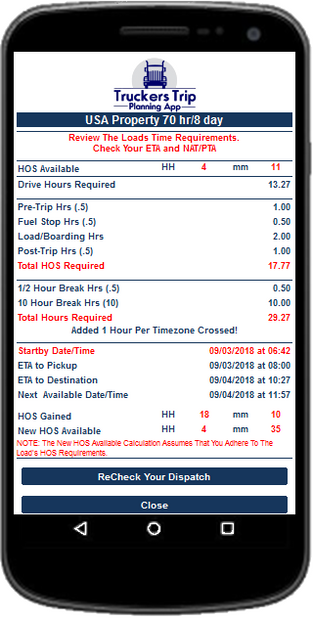
The Fact is that if you can start your clock on time, you can run this load, deliver it 13 hours early, and have 4 hours and 35 minutes left on your 70 hour clock after you run the load.


  1. According to the Hours of Service Recap Calculator, you have 4 hours and 11 minutes left on your 70 hour clock.

  2. Based on the total distance of 663.3 miles driving 50 miles per hour you will need 13 hours and 16 minutes of drive time for the load.

  3. To reach your pickup on time you will need to start your clock on September 3, 2018 at 06:42:54 a.m. do your first pretrip, fuel and then drive 18 minutes to your pickup.

  4. At your pick up you will need to load for 1 hour and start driving to your delivery.

  5. During your trip you will have to stop for an 8 hour break, do your first post trip, and take a 10 hour rest break. Get up the next morning and do your second pretrip. Then continue driving to your delivery.

  6. On September 4, 2018 you will arrive at your delivery and use 1 hour to unload, and 30 minutes for your second post trip.

  7. You will be available for another load at 11:57 a.m. on September 4, 2018.

Hours of Service Required:

The load required 13.27 hours of drive time (663.3 /50) and another 4.5 hours of on duty not driving time (2-30 minute pretrips, 2-30 minute post trips, 1-30 minute fuel stop, 1-hour to load, and 1-hour to unload) which resulted in a total of 17.77 hours of service to run the load.


Total Overall Hours Required:

Based on the 17.77 hours (17 hours and 46.2 minutes) you had to take 1-8 hour required break and 1-10 hour required break and 1-hour was added because you traveled East and crossed 1-Time Zone which added 11.5 hours (11 hours and 30 minutes) to the trip that was required but not reportable as hours of service. This made the trip require 29.27 hours (29 hours and 16 minutes).


Accounting of Run Time:

You started at 6:42 on September 3, 2018, at 8:00 a.m. on September 3, 2018, 1 hour and 18 minutes elapsed. You arrived at 10:27 a.m. on September 4, 2018 in a different time zone. 27 hours, 46 minutes, and 54 seconds had elapsed. You were ready for your next load at 11:57 on September 4, 2018, 29 hours, 16 minutes had elapsed.


Accounting For Your Hours of Service:

You started with 4 hours and 11 minutes and gained 18 hours and 10 minutes while running the load. You gained 9 hours and 13 minutes on September 2, 2018 at midnight. At midnight on September 3, 2018, you gained 8 hours and 57 minutes. This resulted in you having 22.35 hours (22 hours and 21 minutes) available for the load. The load required 17.77 hours (17 hours and 46.2 minutes) This results with you having 4.58 hours (4 hours and 35 minutes) available for a new load.


What To Watch:

If the new Hours of Service Available would have been negative then of course you would not have been able to legally run this load.


Super Truckers have told me that they don't need the Hours of Service ETA Calculator because they can do this in their head in 30 minutes. What do you think?


Don't stress yourself out! Get Access to the Truckers Trip Planning App and Use the Hours of Service ETA Calculator to determine whether you have the required hours of service and whether you can successfully deliver your load on time before accepting the load.


bottom of page