top of page
Truckers Trip Planning App Logo

The Truckers Trip Planning App Blog provides Industry news and discussions about truckers trip planning and load decisions geared towards helping company truck drivers, leased operators and owner operators gain greater profits from the loads they run.

Truckers-trip-planning-app-on-mobile (1)

The Truckers Trip Planning App includes the Hours of Service App – ETA Calculator but the two key differences in one versus the other is the tools available and whether you have the time and internet resources available to use them.


Remember this first. The Truckers Trip Planning App was originally released in 2016 to answer the three main questions that you need to answer before accepting loads so that you can run acceptable loads rather than having the stress and financial difficulty of running unacceptable loads. "Planning Ahead for Hours of Service Breaks" is an integral part but is not the primary reason for which the Truckers Trip Planning App was built. Now that we have that in it's proper perspective;


Remember This:


Company Drivers only need to know if they have the hours of service required by a load and whether or not they can deliver the load on time. Of course Lease and Owner Operators need to answer those questions as well but most importantly, Lease and Owner Operators need to know if running the load would result in a profit or a loss to their bottom line.

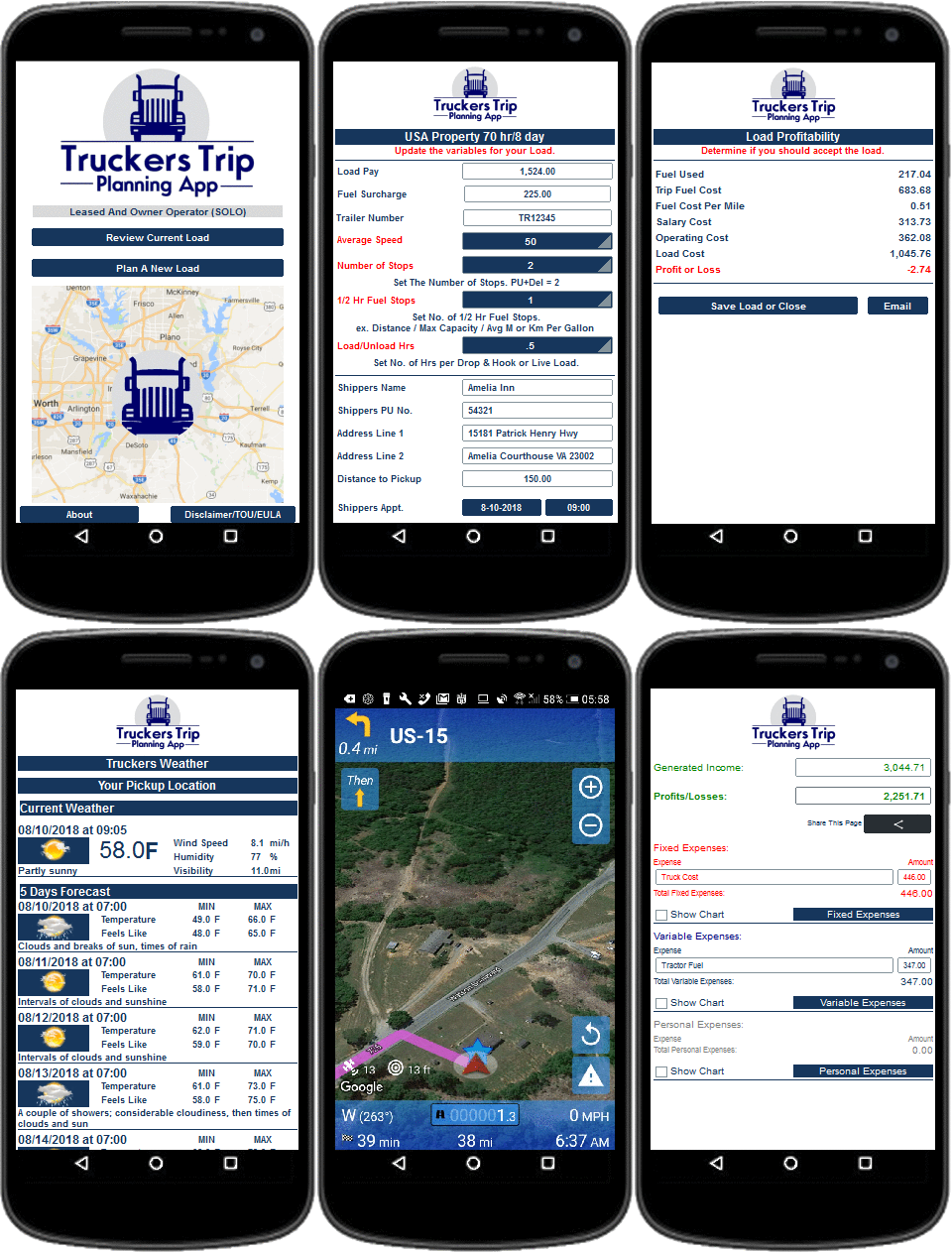
The Truckers Trip Planning App For Company Drivers have the tools to answer the first two questions but it also has the tools for planning how you will run the load (planning your rest breaks has always been a part of this!), tools to handshake with the SmartTruckRoute II App (If needed) for navigation, traffic, and weather alerts, and the tools to maintain your personal Expenses and Accounting.


The Truckers Trip Planning App For Lease and Owner Operators have the same tools as the Truckers Trip Planning App For Company Drivers but also have the tools necessary for answering the third question as to whether running the load would result in a profit or loss to their bottom line. These tools include the Operating Cost Per Mile Calculator to show the Lease and Owner Operator the rate a load must pay in order for them to pay their bills, the Truckers Trip Sheet to see the actual revenue generated by the load, and the Load Profitability Sheet which shows the Lease and Owner Operator useful information that guides them towards the decision as to whether they should accept the load.


Breaking out the Hours of Service App - ETA Calculator was actually a request from a Dispatcher from US Express who wanted to ensure that he was assigning loads to his drivers that they could successfully run. While honoring this suggestion, and looking at it from the perspective of both the Dispatcher and the Driver, it was realized that the tool should be standalone and available when nothing else was. This is the key difference between the Truckers Trip Planning App and the Hours of Service App - ETA Calculator and the key reason why you should have both! In that regard, here's when you should use them:


If you have the time and the resources such as internet service is available, you should always use the Truckers Trip Planning App and all of it's available resources so that you can take advantage of the overall plan and it's concepts to ensure your success. However, when all you need is a quick answer about whether you have the hours of service for a load and whether you can deliver the load on time, then you should use the Hours of Service - ETA Calculator. Why?


Because, first of all you don't have to worry about whether you have internet or not and you really only need to put in limited information to get the answers you need.


Here's how you do that (Watch the video to see what I mean):


Assuming that you have added the icon to your home screen, Simply click on the "icon" to open the app.


1. Select to "Reset and Plan a New Load".

2. Select your "HOS Preference" and click "Done".

3. Update your "Hours of Service Recap" "Save it" and Click on "Dispatch",

4. Select the "Number of Stops",

5. Add the "Number of 1/2 Hour Fuel Stops".

6. Set the "Average number of Hours for Load/Unloads" at each stop,

7. Add the "Distance to your Pickup",

8. Add your "Appointment Date and Time",

9. Add the "Distance to any Additional Stops",

10. Add the "Distance to your Final Delivery",

11. Select whether you will travel "East or West" and add "How many Time Zones You Will Cross",

12. Click on "Check Your ETA's",

13. Read the "Hours of Service App - ETA Calculator" and compare it to your "HOS Available" and your "HOS Gained and Available" after the Load,

14. MAKE A DECISION AS TO WHETHER YOU WILL HAVE THE HOURS TO RUN THE LOAD AND WHETHER YOU CAN DELIVER THE LOAD ON TIME!


Both the Truckers Trip Planning App and the Hours of Service App - ETA Calculator is available for sale. However, on the Stores you will need to purchase them separately. When you purchase the Company Drivers or Lease and Owner Operator Truckers Trip Planning App on the website, the Hours of Service - ETA Calculator is free. So in reality, you're getting the Truckers Trip Planning App at a 30% discount and saving even more on the cost of the Hours of Service - ETA Calculator! This is a no-brainer!


What are you waiting for? Download the Truckers Trip Planning App for your driving arrangement TODAY!


Professional Truck Drivers, do you know your rights granted by the Surface Transportation Assistance Act?


The STAA is a federal law administered by the Occupational Safety and Health Administration (OSHA) of the US Department of Labor to protect commercial vehicle drivers from retaliatory action by carriers if they refuse to drive due to safety concerns.


This is a MYTH: "My Company Does Not Allow Me To Turn Down Loads!"


This is a FACT: Section 405 of the Surface Transportation Assistance Act of 1982 (STAA) (49 U.S.C. 31105) states, in part, that no person shall discharge, discipline, or in any manner discriminate against an employee with respect to the employee’s compensation, terms, conditions, or privileges of employment for refusing to operate a vehicle when such operation constitutes a violation of any Federal rule, regulation, standard, or order applicable to Commercial Motor Vehicle (CMV) safety.


This is a FACT: No driver shall operate a commercial motor vehicle, and a motor carrier shall not require or permit a driver to operate a commercial motor vehicle, while the driver's ability or alertness is so impaired, or so likely to become impaired, through fatigue, illness, or any other cause, as to make it unsafe for him/her to begin or continue to operate the commercial motor vehicle. However, in a case of grave emergency where the hazard to occupants of the commercial motor vehicle or other users of the highway would be increased by compliance with this section, the driver may continue to operate the commercial motor vehicle to the nearest place at which that hazard is removed.


This is a FACT: Your employer may be found to have violated the STAA if your protected activity was a contributing factor in it's decision to take adverse action against you. Such actions may include:

  • Firing or laying off

  • Blacklisting

  • Demoting

  • Denying overtime or promotion

  • Disciplining

  • Denying Benefits

  • Failing to hire or rehire

  • Intimidation

  • Making Threats

  • Reassignment affecting promotion prospects

  • Reducing pay or hours


This is EVIDENCE: Worker fired for not driving while ill, filed whistleblower complaint.


This is MORE EVIDENCE: OSHA is ordering the Cherry Hill, New Jersey-based company to reinstate the driver, pay him more than $276,000 in back wages and damages and take other corrective action.


This is EVEN MORE EVIDENCE: OSHA orders Brindi Trailer Sales and Services Inc. and Robert Urbina Brindi to pay $45K. All the truck driver wanted was a safe vehicle to operate. His employer fired him instead.


This is the BOTTOM LINE: If you refuse to violate any Hours of Service Rules, refuse to operate a commercial vehicle while violating Federal Motor Carriers Safety Administration (FMCSA) Regulations, refuse to operate a commercial vehicle because you do not feel safe, or refuse to operate a commercial vehicle because you are ill, you are protected from retaliation by the trucking company.


This is the Truckers Trip Planning App!

The Truckers Trip Planning App was built with the precedence of seeing up front if you have the hours of service to run a load, whether you can legally deliver that load on time, and whether or not that load is profitable before accepting the load and planning the route. Better yet, The Truckers Trip Planning App was built to keep you both safe and profitable while taking control of your time and demanding to be the Captain of Your Own Ship!


Updated: Jan 23, 2019

Hours of Service Trip Planning is one of the core elements in the Truckers Trip Planning App and was a focal point in the build and release of the app in March 2016 when Young and Healthy Marketing LLC formulated the concept of "Putting the Horse before the Cart".


Don't be misled! Hours of Service Trip Planning is not the result of attempting to tell you when and where to take your breaks. As a Professional Driver, you should be able to make that determination on your own. After-all, Nine times out of ten, no one will be able to tell you where you are when you feel the need to take a break and no one can tell you how to plan your load based on your own individual driving habits!


However, what we can do is to tell you the hours of service required by a load so that you could easily determine whether you have the remaining hours of service to run that load and give you the tools to plan the load based on your own individual driving habits. If you cannot accomplish the load then you should be communicating that to your dispatcher for plans to either relay the load or simply give it to someone who can.


For example, let's assume that you have received this dispatch:


Pickup: 837 West Lumber Street, Chicago, Ill, 60608 at 12:51 am on March 15, 2018

Deliver: 521 Burlington Blvd, Dallas TX 75208 at 2:12 pm on March 16, 2018


Truckers Drive Time Based On Google Maps.
Drive Time For A CAR Based on Google Maps at 69 mph.

As a Professional Driver you should be cognizant of what the load requires based on "hours of service and not drive time": You should realize that there are a few hours of service variables that are missing in the dispatch that you will have to determine like pre trips, post trips, fuel stops, load times and unload times. Furthermore, you should realize that Google Maps are not truck specific. However, in this example we will use the map just to make a point.


Ultimately, we want to show you what would be required of you in order to accomplish this insane objective.


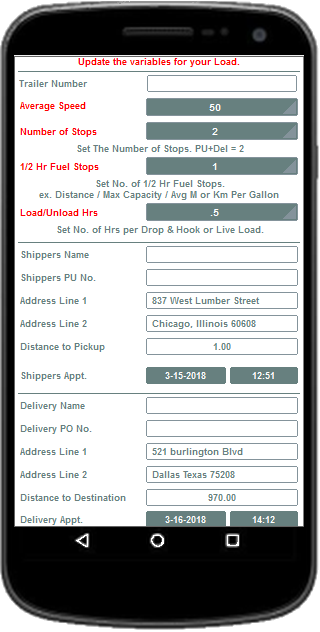
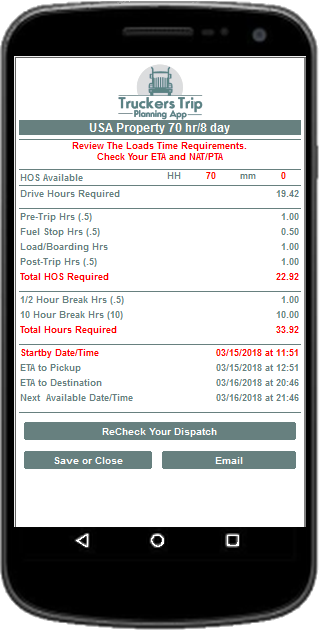
Here is a visual of the load's dispatch and the loads time requirements while planning the load based on hours of service requirements at 50 miles per hour:


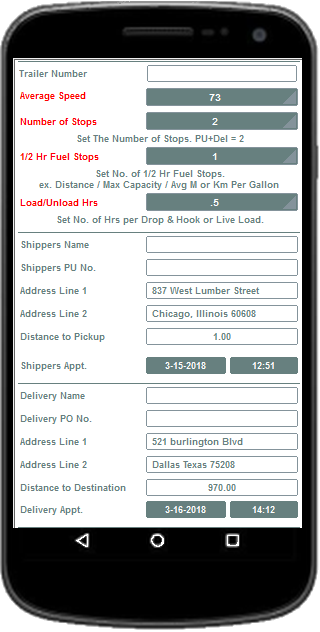
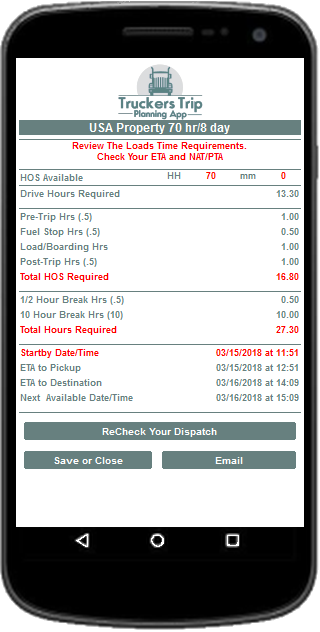
How fast must you drive to deliver this load to 521 Burlington Blvd, Dallas TX 75208 at 2:12 pm on March 16, 2018?


If you can drive 73 miles per hour continuously without any slow downs resulting from traffic, weather, road conditions and the like throughout the trip, then you can reach your destination on time. If you cannot maintain 73 miles per hour then you will have to either drive faster while pushing everything and everybody out of your way or just leave it alone.


Trip Planning a load at 73 mph is simply planning to be unsafe!

Hours of Service Trip Planning Speeding Truck

It makes absolutely no sense at all that anyone would be able to maintain that speed throughout the trip without expecting to encounter numerous slowdowns that would have a significant impact on the accomplishment of such a plan.


You should not mislead your dispatcher or yourself to believe that you will be able to meet any ETA's based on this plan because when you do, plans are made accordingly for your next load and you alone will have to account for this mistake along with any unsafe incidents or accidents that may be caused by your being irresponsible. "Commit only to those things that you know you can do and not to what you think you can do" and don't set yourself up for failure by doing only what someone wants you to do at the risk of your CDL! Maybe then we don't have to see the Federal Motor Carrier Safety Administration (FMCSA) mandating such things as Electronic Logging Devices (ELDs) to keep us under control.


Take advantage of the original Hours of Service Trip Planning App; "The Truckers Trip Planning App" and see what the load requires before committing to the load. As Truck Drivers ourselves, we built this app with the help of other truckers to help all truckers to be safe and profitable while in the truck.


Please share this article to help other truckers see that the Truckers Trip Planning App was "Built by Truckers, For Truckers" so that they can be aware of imitators and copy cats who wants to manipulate us into doing the very things we seek to avoid; like being all stressed out, unsafe, and broke!!


bottom of page