top of page
Truckers Trip Planning App Logo

The Truckers Trip Planning App Blog provides Industry news and discussions about truckers trip planning and load decisions geared towards helping company truck drivers, leased operators and owner operators gain greater profits from the loads they run.

Truckers-trip-planning-app-on-mobile (1)

Updated: Nov 22, 2018


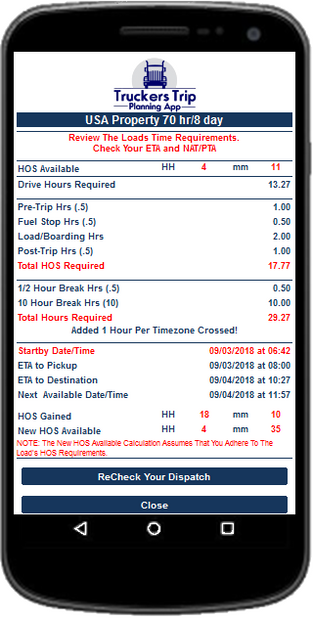
Learn how to read the Hours of Service ETA Calculator from the Truckers Trip Planning App, determine whether you have the required hours of service for the load, and determine the remaining hours of service you have left for your next load.


Objective: Determine if you should accept the load based on the #hoursofservice requirements, reject the load, or inform your dispatcher that the load will need to be relayed to another driver.


To learn how to use the Hours of Service ETA Calculator we will use the following scenario:


On September 2, 2018 you did an #hoursofservicerecap to determine you had 4 hours and 11 minutes left on your 70 hour clock. On September 2, 2018, you received your dispatch and updated the Truckers Trip Planning Worksheet with your dispatch requirements which required you to drive 15 miles from your current location to your pickup appointment on September 3, 2018 at 08:00 a.m. You had a delivery window scheduled for September 4, 2018 at the latest time of 11:59 p.m. which was 648.3 miles East of your pickup which required you to cross 1 time zone. You indicated that you would need 1 - 30 minute fuel stop and because this was a live load you selected 1 hour each for loading and unloading. You planned the trip at 50 miles per hour and you selected 2 stops for the load.


Without the Truckers Trip Planning App and the #HoursofServiceETACalculator, you would probably be stressing now trying to figure out how you will run this load with only 4 hours of service remaining and if you accepted it, you would probably be under stress the entire run worrying about it.


However the beauty of having the Truckers Trip Planning App and the Hours of Service ETA Calculator, is that you can quickly see if it is at all possible to run this load and relieve yourself of that unwanted stress in less than 5 minutes.


The Fact is that if you can start your clock on time, you can run this load, deliver it 13 hours early, and have 4 hours and 35 minutes left on your 70 hour clock after you run the load.


  1. According to the Hours of Service Recap Calculator, you have 4 hours and 11 minutes left on your 70 hour clock.

  2. Based on the total distance of 663.3 miles driving 50 miles per hour you will need 13 hours and 16 minutes of drive time for the load.

  3. To reach your pickup on time you will need to start your clock on September 3, 2018 at 06:42:54 a.m. do your first pretrip, fuel and then drive 18 minutes to your pickup.

  4. At your pick up you will need to load for 1 hour and start driving to your delivery.

  5. During your trip you will have to stop for an 8 hour break, do your first post trip, and take a 10 hour rest break. Get up the next morning and do your second pretrip. Then continue driving to your delivery.

  6. On September 4, 2018 you will arrive at your delivery and use 1 hour to unload, and 30 minutes for your second post trip.

  7. You will be available for another load at 11:57 a.m. on September 4, 2018.

Hours of Service Required:

The load required 13.27 hours of drive time (663.3 /50) and another 4.5 hours of on duty not driving time (2-30 minute pretrips, 2-30 minute post trips, 1-30 minute fuel stop, 1-hour to load, and 1-hour to unload) which resulted in a total of 17.77 hours of service to run the load.


Total Overall Hours Required:

Based on the 17.77 hours (17 hours and 46.2 minutes) you had to take 1-8 hour required break and 1-10 hour required break and 1-hour was added because you traveled East and crossed 1-Time Zone which added 11.5 hours (11 hours and 30 minutes) to the trip that was required but not reportable as hours of service. This made the trip require 29.27 hours (29 hours and 16 minutes).


Accounting of Run Time:

You started at 6:42 on September 3, 2018, at 8:00 a.m. on September 3, 2018, 1 hour and 18 minutes elapsed. You arrived at 10:27 a.m. on September 4, 2018 in a different time zone. 27 hours, 46 minutes, and 54 seconds had elapsed. You were ready for your next load at 11:57 on September 4, 2018, 29 hours, 16 minutes had elapsed.


Accounting For Your Hours of Service:

You started with 4 hours and 11 minutes and gained 18 hours and 10 minutes while running the load. You gained 9 hours and 13 minutes on September 2, 2018 at midnight. At midnight on September 3, 2018, you gained 8 hours and 57 minutes. This resulted in you having 22.35 hours (22 hours and 21 minutes) available for the load. The load required 17.77 hours (17 hours and 46.2 minutes) This results with you having 4.58 hours (4 hours and 35 minutes) available for a new load.


What To Watch:

If the new Hours of Service Available would have been negative then of course you would not have been able to legally run this load.


Super Truckers have told me that they don't need the Hours of Service ETA Calculator because they can do this in their head in 30 minutes. What do you think?


Don't stress yourself out! Get Access to the Truckers Trip Planning App and Use the Hours of Service ETA Calculator to determine whether you have the required hours of service and whether you can successfully deliver your load on time before accepting the load.


Learn how to update the Trucker Trip Planning Worksheet from the Truckers Trip Planning App so that it can correctly calculate your required hours of service, your Estimated Time of Arrivals (ETA), your Next Available Time (NAT), and your remaining hours of service for a load.


Objective: Use the Trucker Trip Planning Worksheet as the initial tool in determining whether you have the required hours of service and whether you can successfully deliver the load on time before accepting the load.


YOU MUST correctly enter your dispatch into the #TruckerTripPlanningWorksheet for it to accurately calculate your hours of service and ETA requirements.


Trucker Trip Planning Worksheet image

There are critical pieces of information that you cannot omit!

  1. You must have correctly chosen your #hoursofservice preference.

  2. You must correctly choose the correct speed in which you will travel.

  3. You must correctly choose the number of stops on your dispatch.

  4. You must correctly select the number of fuel stops you will need.

  5. You must correctly choose the number of load and unload hours.

  6. You must enter a distance to your pickup from your current location and even if you are already there you must enter at least 1 mile or kilometer.

  7. You must enter the correct date of your pick up appointment.

  8. You must enter the correct time of your pickup and if you have a window you should use the latest time of that window. You Must correctly choose whether that time is a.m or p.m.

  9. You must enter the correct distance from your pick up to your next stop. If you have multiple stops on your load, you must enter the distance between each stop on your load. If your next stop is your delivery location, you must enter the distance from your pickup to your delivery.

  10. You must select whether you will travel East or West and the number of time zones you will cross.

With the required information entered into the trucker trip planning worksheet, you simply need to select the button to "Check Your ETA's".


Get Access to the Truckers Trip Planning App and Use the Trucker Trip Planning Worksheet to determine whether you have the required hours of service and whether you can successfully deliver your load on time before accepting the load.


Updated: Sep 12, 2018


Drive time is not all that team truck drivers need to know before accepting and trip planning a load.


Today, there was a visitor on the #truckerstripplanningapp website visiting the #teamdrivers #tripplanning pages who posted; “Irvine Ca. To van ormy tx 1358 running team 2 fuel stops..how long it will take. It's 25hrs.” I responded to the chat message with “What’s your question?” and the visitor quickly left the website.


It was obvious to me that the visitor was attempting to impress upon whoever could see his message how quickly he could figure out the time required to run his load without the use of any tools.


After examining the message, I can quickly see that the team drivers had 1358 miles to deliver the load and needed 2 fuel stops. In determining how long the trip would take, the visitor determined that the team needed 25 hrs. Clearly, this is the drive time required by the load! Is Calculating Drive Time Enough?


Let’s examine this using the simple calculations that we all know so well:

“1358 miles” divided by “25 hours” = 54.32 miles per hour or maybe even “1358 miles” divided by “55 miles per hour” = “24.69 drive hours.” Would you accept this load if you as #teamdrivers had only 25 hours of service available?

Teams Leased And Owner Operator Truckers Trip Planning App
Team Leased And Owner Operator Truckers Trip Planning App

How fast can you answer these questions before you make that decision?

  • Is the team Company Drivers, Leased Operators, or Owner Operators?

  • If the team is #leasedoperators or #owneroperators what is the rate per mile for the load?

  • If the team is leased operators or owner operators, what is the teams operating cost per mile?

  • If the team is leased operators or owner operators, what is the actual revenue generated by the load?

  • If the team is leased operators or owner operators, is the load profitable?

  • What time is the pickup appointment?

  • What is the latest time the team must start in order to pickup the load on time?

  • Can the Team pickup the load on time?

  • What is the date and time of the delivery appointment?

  • Can the Team deliver the load on time?

  • How many non-driving hours will the team need?

  • How many hours will the team need for #fueling?

  • How many hours #pretrips will the team need?

  • How many hours #posttrips will the team need?

  • How many load and unload hours will the team need?

  • What is the total #hoursofservice required by the load?

  • How many ½ hour #restbreaks will the team need?

  • Will the team cross any time zones while running the load?

  • What is the total time required to run the load?

  • What is the Estimated Time of Arrival at the Destination?

  • When will the team be available for another load?

  • How many hours of service will the team have available for another load?

Taking only in consideration the drive time we calculated, what are your thoughts? Is Drive Time all that Team Drivers Need To Know?


bottom of page